Three months ago, publishing one video took me most of a Saturday. By using claude I research, script, record, and re-record because I flubbed a line. I edit, caption, set the thumbnail, and upload; by publish, I never wanted to look at the thing again.
Last Tuesday I published a video in 26 minutes, start to finish, while also making lunch.
Pipeline-focused workflow
Nothing about my niche changed. I stopped treating each step as a separate task and began viewing it as a single pipeline. I assigned claude as the tool to one stage and eliminated manual hand-offs I could automate.
This post outlines that exact pipeline: the tools, the order, and the actual time for each step. Additionally, it is not the marketing-page version of ‘instant’ content creation.
You’ve been cobbling together five AI tools and still feel like you’re doing more copy-pasting than creating. This is the fix for that.
Quick Overview: The 6-Stage Stack
| Stage | Tool | Time | What It Replaces |
|---|---|---|---|
| 1. Research & angle | VidIQ / TubeBuddy | 3 min | Guessing what to make |
| 2. Script | ChatGPT or Claude | 5 min | A blank page and writer’s block |
| 3. Voiceover | ElevenLabs | 3 min | Hiring a voice actor or recording retakes |
| 4. Footage & B-roll | Veo 3.1 or InVideo AI | 8 min | Stock footage hunting or filming |
| 5. Captions & edit | CapCut | 4 min | Manual timeline editing |
| 6. Thumbnail & publish | Canva AI + native scheduler | 3 min | A separate design tool and app-switching |
Total: roughly 26 minutes. Let’s go stage by stage.
Stage 1: Research & Angle (3 minutes)
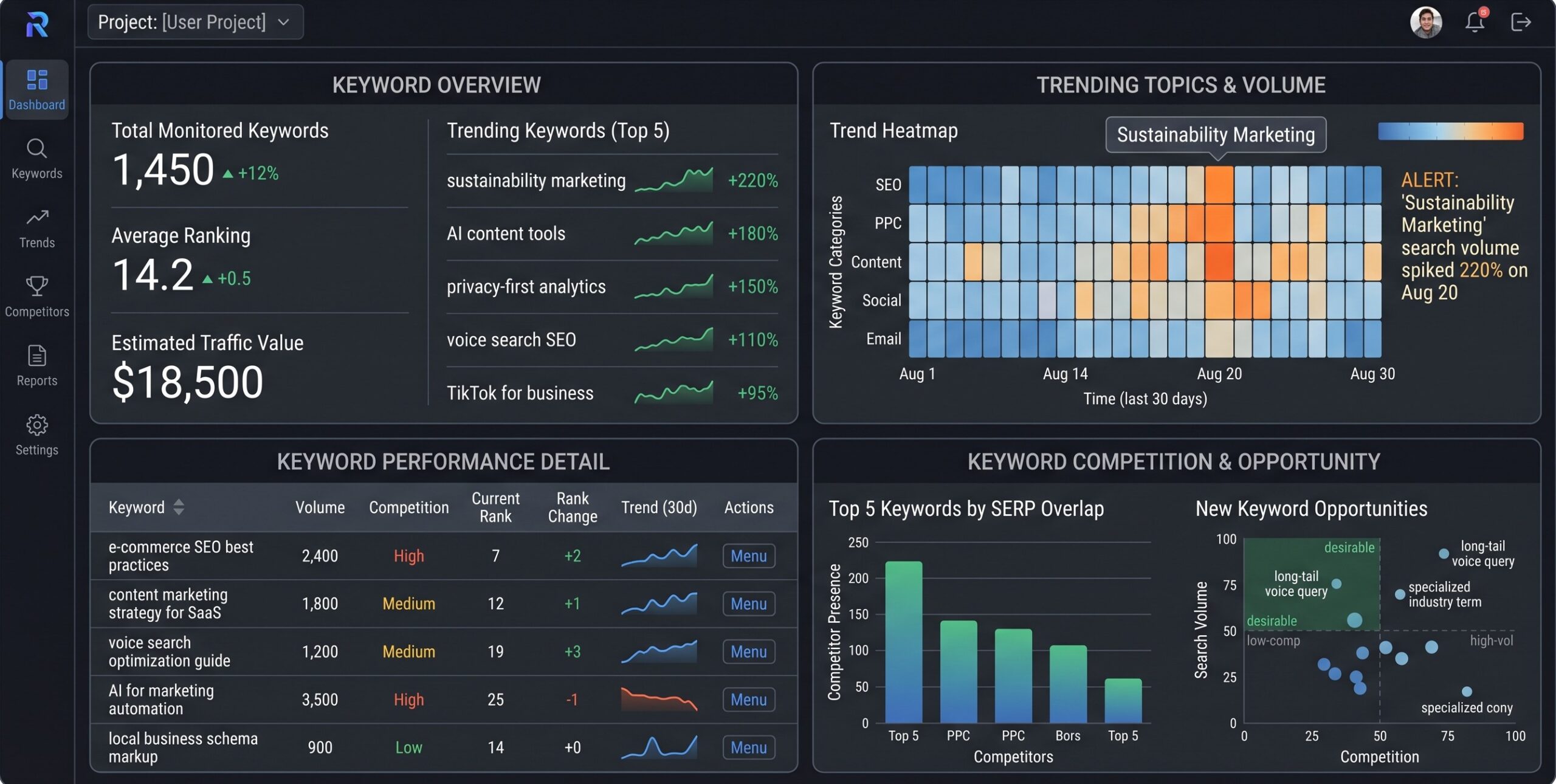
Skipping this stage is the single biggest reason AI-generated channels plateau. You can have the smoothest production pipeline in the world and it won’t matter if nobody’s searching for what you’re making.
I run every idea through a trend/keyword tool before writing a single word of script. VidIQ and TubeBuddy both do this well the point isn’t which one, it’s that you do it at all. I’m looking for:
- Search volume that’s rising, not flat or declining
- A specific angle competitors haven’t covered yet
- A title format that’s already proven to work in the niche
This step alone is why some of my “low effort” AI videos outperform videos I spent hours filming myself.
Stage 2: Script (5 minutes)
This is where most creators either over-rely on AI or avoid it entirely, and both are mistakes.
I don’t ask ChatGPT or Claude to “write me a video about X.” That produces generic, forgettable output every time. Instead, I give it structure and let it fill the structure in:
- Hook (0–5 seconds): a specific claim or question, not a generic greeting
- Body: 3–4 concrete points, each with one real example or number
- CTA: one clear next action, not three
For fact-heavy explainers, I lean toward Claude, since it hedges rather than inventing numbers. ChatGPT’s tone tends to feel more casual out of the box for punchier, trend-driven scripts. Neither is better across the board; it depends on the content.
The step people skip: read the script out loud once before sending it to voice-over. AI-written scripts often have sentences that look fine on a page but are a mouthful to actually hear.
Stage 3: Voice over (3 minutes)
ElevenLabs is genuinely the tool that made faceless content sound less like faceless content. The difference between 2024-era AI voices and where things are now isn’t subtle breath sounds, natural pacing, emotional inflection that actually matches the sentence.
A few things that noticeably improved my output quality here:
- Break long sentences into two shorter ones the AI paces punctuation more naturally than run-ons
- Use a consistent voice profile across a series so returning viewers recognize it
- Always listen to the full render before moving on; AI narration occasionally mispronounces a proper noun and it’s a five-second fix now versus a re-render later
These are best free voiceover tools [https://aiflohub.com/best-elevenlabs-alternatives-in-2026-5-free-and-budget-friendly-ai-voice-cloners/]
Stage 4: Footage & B-Roll (8 minutes)
This is the longest stage, and it’s also the one where your tool choice matters most.
| Tool | Best For | Watch Out For |
|---|---|---|
| Veo 3.1 | Long-form narration, synced ambient audio, photorealistic scenes | Shorter individual clip length (~8 sec), more stitching |
| InVideo AI | Fast full-video assembly from a single prompt, huge stock library | Less original/cinematic, can feel templated |
| HeyGen | Presenter-style, trust-building content with a consistent avatar | Not built for pure B-roll variety |
I default to Veo 3.1 for anything narration-led and InVideo when I need volume fast a listicle or news-recap format where speed matters more than originality. (If you want the full breakdown of why Veo has become my default over Sora, I covered that in a separate post Sora’s own shutdown timeline made this an easy call.)
Practical tip: generate your B-roll in the same order as your script beats, not out of order. It sounds obvious, but it cuts your editing time in Stage 5 by roughly half because everything is already sequenced.
Stage 5: Captions & Edit (4 minutes)
CapCut’s auto-caption and auto-cut features do 90% of the editing work that used to require a real timeline session. My process:
- Drop the voice-over and B-roll in, in order
- Run auto-captions, then do one manual pass for accuracy (AI captioning still trips on niche terminology and brand names)
- Trim any dead air between script beats AI voiceovers sometimes leave slightly longer pauses than a human reading naturally would
Don’t skip the manual caption pass. A wrong caption on a niche term is one of the fastest ways to look obviously AI-generated in a bad way.
Stage 6: Thumbnail & Publish (3 minutes)
Last stage, and the one people rush the most which is backwards, since your thumbnail decides whether any of the previous 23 minutes of work gets watched.
- Canva’s AI tools can generate a base thumbnail image or clean up a still frame from your footage in under a minute
- Keep text on the thumbnail to 3–4 words max, high contrast, readable at phone-thumbnail size
- Write your title and description before uploading, not after I keep a saved template with placeholders so I’m filling in blanks, not starting from a blank field
Publish through your platform’s native scheduler if you’re batching content, or straight to live if it’s timely.
What This Stack Actually Costs
| Tool | Typical Monthly Cost |
|---|---|
| VidIQ / TubeBuddy | $0–$29 |
| ChatGPT or Claude | $20 |
| ElevenLabs | $5–$22 |
| Veo 3.1 / InVideo AI | $20–$30 |
| CapCut | $0 (free tier covers most needs) |
| Canva | $0–$13 |
Realistic total: $45–$115/month depending on volume and which tiers you need. That’s less than most people spend on a single freelance editor for one video.
The Honest Trade-Offs
I’m not going to pretend this pipeline is flawless, because it isn’t:
- You lose some voice. A fully AI-assisted stack can start to sound like every other AI-assisted channel if you don’t inject your own angle at the script stage. The research step (Stage 1) is what prevents this a unique angle survives AI production, a generic one doesn’t.
- Tool churn is real. I had to rewrite part of this exact workflow this year because a tool I relied on got discontinued with a few months’ notice. Build your stack knowing pieces of it might need swapping.
- Quality control still needs a human. Every stage above has an “AI does 90%, I check the last 10%” step baked in on purpose. Skipping those checks is where AI channels get sloppy fast.
Final Thought
The goal was never to remove myself from the process it was to stop spending my time on the parts that don’t actually require a human (retyping a script, hunting stock footage, manually captioning) so I have more of it left for the parts that do (deciding what’s actually worth making). Twenty-six minutes from idea to published video isn’t a gimmick. It’s just what’s left over once you stop doing the tedious parts by hand.
Check out 5 best and free ai voice tools [https://aiflohub.com/best-elevenlabs-alternatives-in-2026-5-free-and-budget-friendly-ai-voice-cloners/]
Leave a Reply