I went looking for a straight answer to this and couldn’t find one.
Every comparison I opened was the same shape. A table of features. “200+ voices!” “Lifelike quality!” A pricing screenshot copied off the official page. Then a conclusion that basically said both are great, pick what suits you which is a useless thing to tell someone about to spend money.
Nobody answered the questions I actually had. What does one finished video cost? What happens when a line comes out wrong and you have to fix it? Does either of them fall apart on a 1,500-word script?
So I signed up for both, wrote one script, and ran it through each of them the same way. Same text, same chunk sizes, same listening setup. Then I read through the fine print on licensing and YouTube’s current policies, because that part turned out to matter more than the voices did.
Here’s what I found. I’m not running a huge channel and I’m not going to pretend otherwise this is a tool test, written for someone about to choose between two subscriptions.
The short version
- ElevenLabs if your videos live or die on the narration storytelling, true crime, motivational, documentary. Anything where the voice is the product.
- Murf AI if you’re making explainers, tutorials, listicles, or slide-based content where clarity and easy editing matter more than emotional delivery.
- Neither yet if you haven’t run your own script through both free tiers. That test takes fifteen minutes and settles the argument better than any article.
1- What actually matters here (and what doesn’t)
Voice count is the number everyone advertises and the one that matters least. You’ll settle on one main narrator, maybe a second for a different series. Four hundred options is not four hundred times better.
The things that genuinely separate these two:
Does it hold up across a long script? A 10-minute video is roughly 1,300–1,600 words. Plenty of tools sound superb for one sentence and start wobbling odd emphasis, slight tone shifts deep into a long generation.
What does one finished video cost? Not the sticker price. The per-video cost including the re-renders, because you will re-render.
How painful is fixing one bad line? Underrated until it happens to you at 1am.
Do you legally own the output? Free tiers usually say no, and monetized YouTube counts as commercial use. This trips people up constantly.
Can you control pronunciation? If your niche involves brand names, acronyms, or non-English words, this becomes a daily fight.
2- What ElevenLabs is like to use
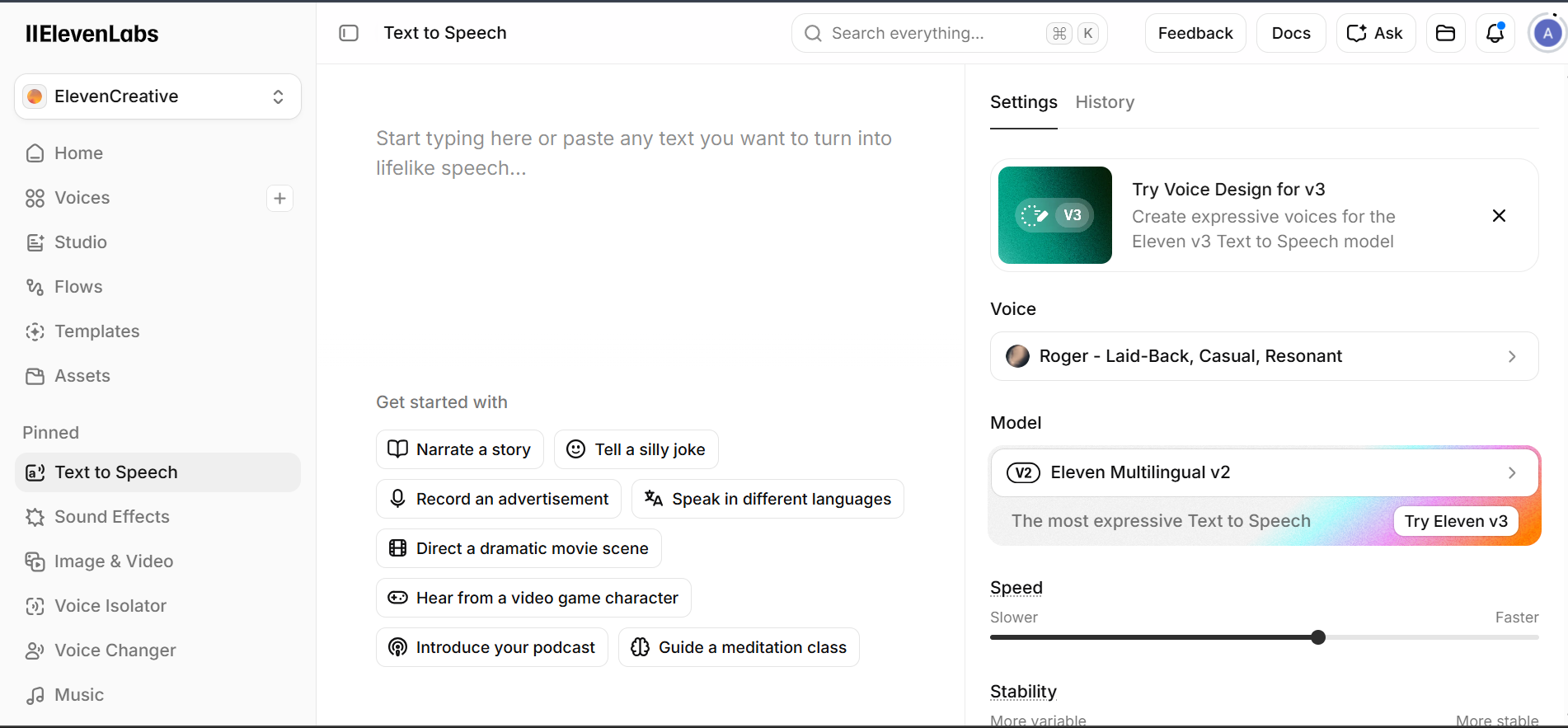
The quality is not hype. Run a paragraph through it and you get breathing, natural speed changes, and small hesitations in the right places. On emotional or narrative writing, it’s the closest thing to a human read I’ve heard from a text-to-speech tool.
What stood out as genuinely good:
- Emotional range. Write a tense sentence and it sounds tense. That’s rare.
- Punctuation behaves like a control panel. Ellipses create hesitation, line breaks create real pauses. Once you write for the tool, output improves without touching a single slider.
- Voice cloning is available on affordable tiers. If a unique channel voice matters to you, this is the differentiator.
- Strong multilingual output if you’re thinking about translated versions later.
What was frustrating:
- Credits are counted in characters, not minutes, which makes budgeting unintuitive until you convert it yourself. Roughly, the mid creator tier lands near 100 minutes of audio per month.
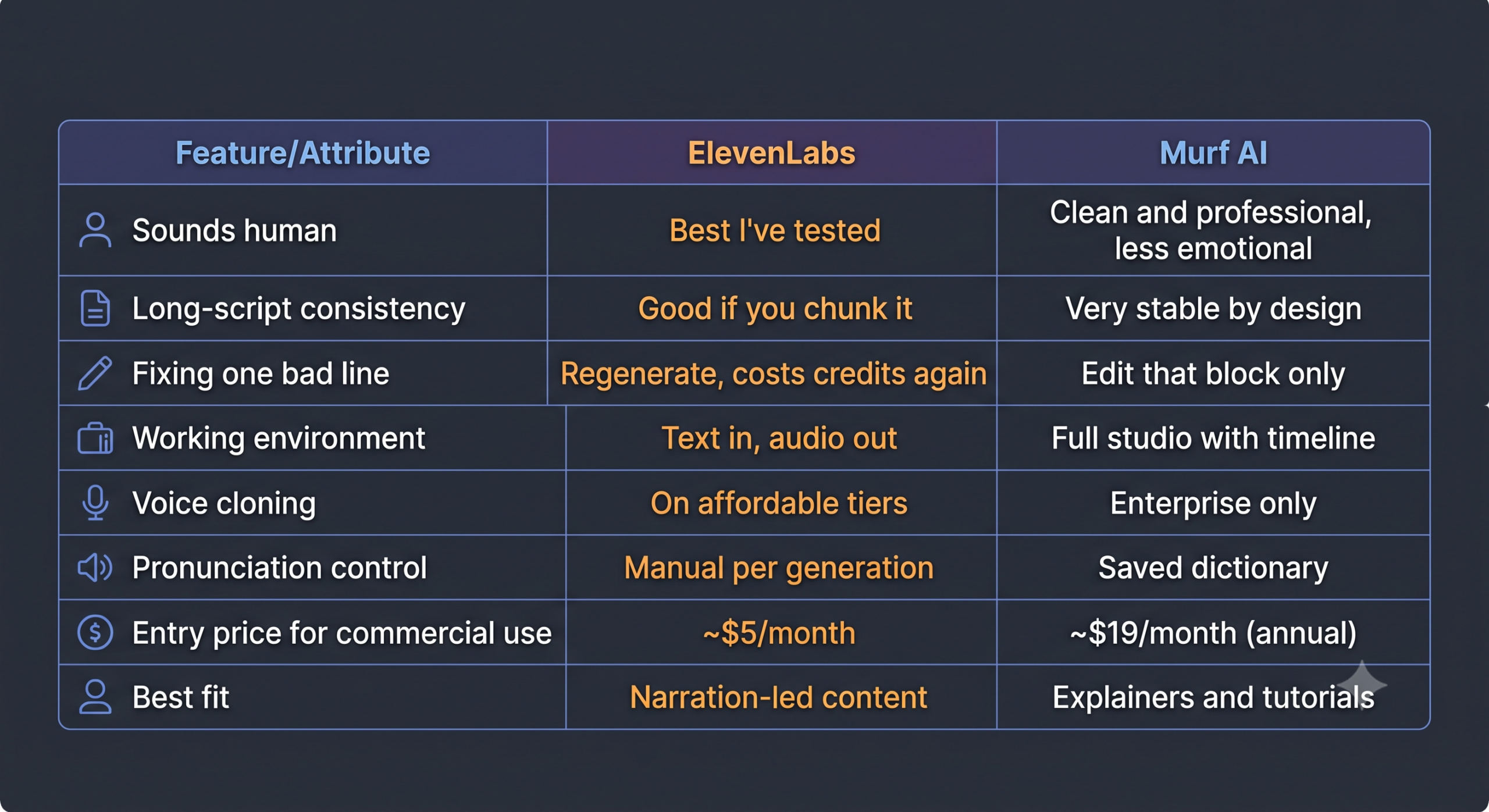
- Re-renders cost you again. Every time you regenerate a block, it comes out of the same pool. Plan for meaningfully more generation than your script length a rough working assumption is 1.5x once fixes are counted.
- Long single generations get less consistent. Splitting the script into smaller chunks fixed this in my testing, but you have to know to do it.
- It’s a voice tool, not a production suite. You get audio files. Timeline work, syncing, and mixing all happen in your video editor.
Pricing when I checked (verify on their page this changes often): a free tier around 10 minutes a month with no commercial rights and required attribution; an entry paid tier near $5/month that unlocks commercial use; a creator tier near $22/month for roughly 100 minutes plus higher-quality voice cloning; then $99/month and up for volume.
If you’re publishing a handful of videos a month and don’t need cloning yet, the $5 tier is a reasonable starting point rather than jumping straight to $22.
3- What Murf AI is like to use
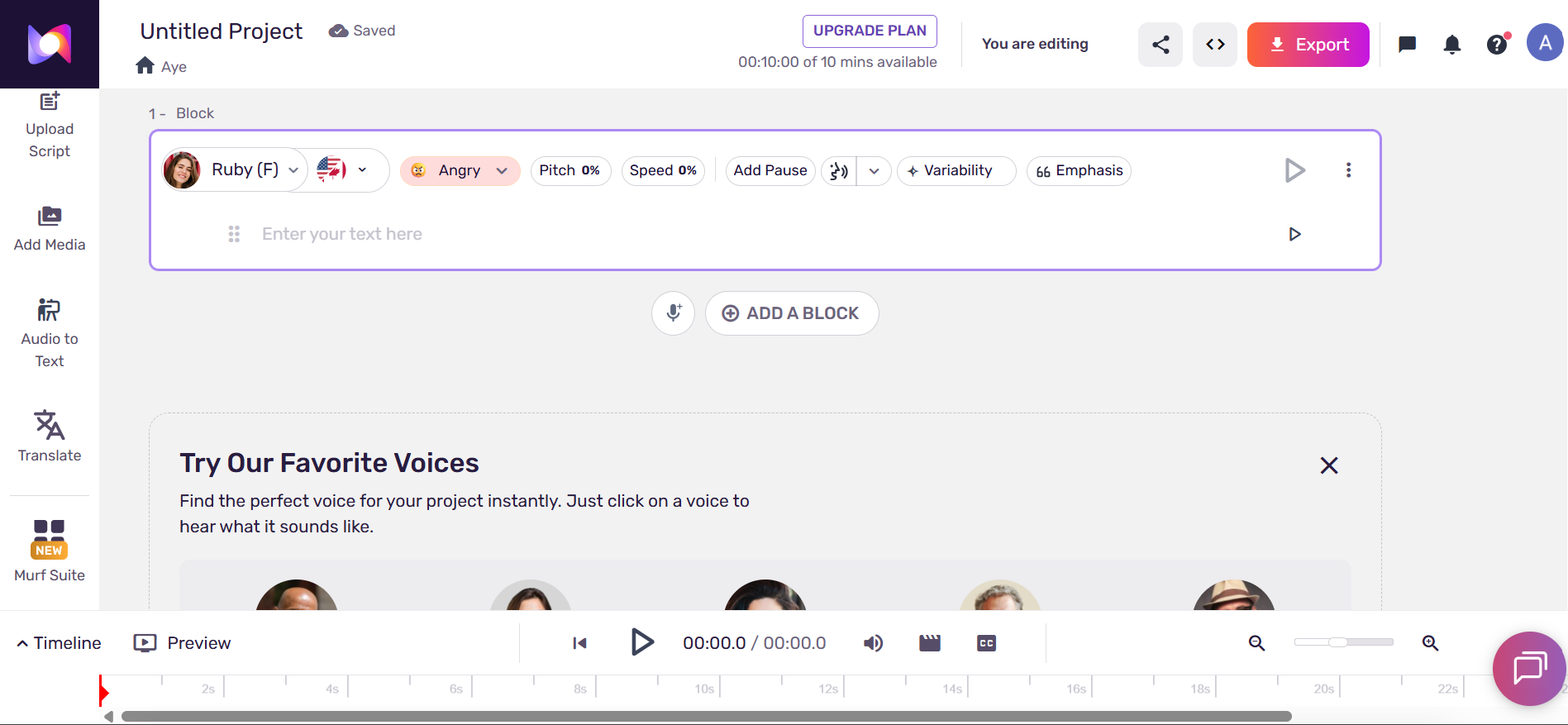
Murf is a different category of product, which took me a bit to appreciate.
ElevenLabs gives you a text box. Murf gives you a workspace a timeline, script split into editable blocks, and the option to drop your video underneath so you can line narration up with what’s on screen.
What stood out as genuinely good:
- Block-level editing. One line sounds wrong? Regenerate that block. Everything else stays untouched. Across a long script this is a real time saver and it’s the clearest practical advantage Murf has.
- Consistency. The voices don’t surprise you. Sentence 200 sounds like sentence 1. For tutorials and educational content, predictable is exactly what you want.
- Built-in timeline sync, so you’re adjusting pacing per block instead of nudging audio files around after the fact.
- A saved pronunciation dictionary. Teach it a word once, it remembers across the project. If your niche is full of product names or jargon, this alone might decide it.
- Canva, PowerPoint, and Google Slides integrations if your videos are slide-driven.
What was frustrating:
- Noticeably less emotional. It’s a polished professional narrator, not a storyteller. On dramatic or narrative writing it reads more like corporate training material.
- Voice cloning is Enterprise-only. This is the big structural limitation. If cloning your own voice is the goal, Murf’s normal plans won’t get you there, and Enterprise isn’t priced for solo creators.
- Minutes don’t roll over. Quiet month, wasted allowance.
- The free plan doesn’t allow downloads at all. You can audition voices, you can’t export anything.
Pricing when I checked (verify before buying): free tier with about 10 minutes total generation, no downloads, no commercial rights; Creator near $29/month monthly or about $19/month billed annually, giving roughly 2 hours of generation per month with full commercial rights; Business near $99/month monthly or $66 annually with substantially more hours.
4- Head to head
The cost-per-video math
This is the part nobody writes out, so here it is.
Say you publish four 10-minute videos a month. That’s about 40 minutes of finished audio but realistically 55–65 minutes of generation once you count re-renders and testing your intro a few times.
- ElevenLabs creator tier (~$22): roughly 100 minutes. Fits comfortably. About $5.50 per video.
- Murf Creator (~$19 annual): roughly 120 minutes a month. Also fits. About $4.75 per video.
They’re close enough that price shouldn’t decide it at this volume which is good news, because it means you can choose based on your content instead of your budget.
Where it splits: at eight or more videos a month, Murf’s hourly allowance stretches further and block-editing wastes fewer regenerations. At one or two premium videos a month where the narration is the whole selling point, ElevenLabs at $5–$22 is hard to argue with.
Best free Alternatives for Elevenlabs [https://aiflohub.com/best-elevenlabs-alternatives-in-2026-5-free-and-budget-friendly-ai-voice-cloners/]
5- A workflow that avoids the obvious traps
This is assembled from what went wrong in testing plus what both platforms’ own docs recommend. It’s not complicated, but the order matters.
1. Read your script out loud before pasting it anywhere. If you run out of breath, the sentence is too long. AI voices don’t inhale, and long sentences are where synthetic narration sounds most obviously synthetic.
2. Format for the machine, not the page. Spell out numbers and abbreviations the way you want them spoken. “Twenty twenty-six,” not “2026,” unless you’ve tested it. Use ellipses where you want hesitation and hard line breaks where you want a real beat.
3. Split the script into 200–300 word chunks. This was the single biggest quality improvement I found. Short chunks stay consistent, render faster, and when one goes wrong you only redo that piece. Murf does this natively with blocks; in ElevenLabs you split manually.
4. Test your first 30 seconds three different ways. Different voice, different pacing, different opening line. Your intro carries retention. Fifteen minutes here is worth more than an hour on the rest of the script.
5. Listen on a phone speaker, not headphones. Most viewers watch on a phone in a room with noise. Voices that sound rich in headphones can sound thin through a phone speaker. Check both before committing to a voice.
6. Clean it up in a free editor. Audacity (free) for light normalization, then CapCut or DaVinci Resolve to assemble. Two things matter: consistent voice loudness, and background music sitting well under the narration around 15–20% is a common starting point. Loud music over synthetic narration is a fast way to lose people.
7. Keep a pronunciation notes file from day one. Every mangled word, write down the phonetic spelling that fixed it. Murf will store these for you; with ElevenLabs you’ll want your own list.
Modern AI Automation Agency Stack[https://aiflohub.com/the-modern-ai-automation-agency-stack-in-2026/]
6- Mistakes that are easy to make
Generating the whole script in one go. It sounds fine early and gets less consistent later, and if one section is off you’ve spent credits on all of it. Chunk everything.
Publishing free-tier audio. Both platforms exclude commercial rights on free plans, and a monetized YouTube video is commercial use. Murf’s free plan won’t even let you download. If you plan to monetize eventually, get on the cheapest paid tier before you publish anything.
Choosing a voice from the platform’s demo text. Demo scripts are written to flatter the voice. Test candidates on your actual writing a warm friendly voice can sound completely wrong on dry analytical content.
Over-punctuating. Stuffing in commas to force pauses produces a stuttering read. Fewer commas, shorter sentences.
Switching voices later. When there’s no face, the voice is your channel’s identity. Changing it resets familiarity with returning viewers, so it’s worth spending real time on the choice up front.
Assuming a better voice fixes retention. It helps. It isn’t the foundation. Script, pacing, and a short intro do more heavy lifting than voice quality does.
7- The 2026 thing that matters more than either tool
I’d genuinely put this above the whole ElevenLabs-vs-Murf question.
In July 2025 YouTube renamed its “repetitious content” policy to “inauthentic content,” and enforcement stepped up sharply through 2026, including a widely reported wave of terminations that hit some large faceless channels.
The nuance a lot of panic content gets wrong: AI voiceover is not against the rules, and faceless channels are not banned as a category. Plenty of monetized channels use synthetic narration. What the policy targets is mass-produced, templated content videos where swapping the topic wouldn’t require any real work.
That’s a useful test before you publish: if I replaced this topic with a different one, would the rest of the video need genuine effort, or just find-and-replace?
Find-and-replace is the risk zone, and no voice tool saves you from it. What keeps a faceless channel eligible is original research, an actual point of view, real editing decisions, and formats that vary between uploads.
Separately: if you use AI to generate realistic scenes or make it appear a real person said something they didn’t, YouTube expects you to toggle the altered-content disclosure at upload. A synthetic narrator reading your own script over stock footage generally doesn’t trip that requirement but policies shift, so check YouTube’s own help pages rather than trusting any blog post, including this one.
8- What I’d tell someone choosing today
Story-driven channel where the narration has to hold attention on its own? ElevenLabs, starting on the cheap paid tier, upgrading only when you hit the ceiling.
Explainers or tutorials on a regular schedule, where you want fewer headaches and easier fixes? Murf AI, billed annually.
Want to clone your own voice without an enterprise budget? That decision’s already made ElevenLabs.
Still unsure? Take one 200-word chunk of your own script, run it through both free tiers, and play both through your phone speaker in a normal noisy room. You’ll know in about a minute, and it costs nothing.
The voice matters more than the “it’s all about the script” crowd admits, and less than the tool companies want you to believe. Get one that doesn’t make people click away, then put your energy into the writing.
FAQ
Can I use ElevenLabs or Murf on a monetized YouTube channel? Yes, on paid plans both include commercial rights there. Free tiers on both exclude commercial use, and Murf’s free plan doesn’t allow downloads at all.
Does using an AI voice get you demonetized? No. An AI voice by itself isn’t the problem. YouTube’s inauthentic content policy targets mass-produced, templated content with no original input which human-made content can fail too.
Which is cheaper? At around four videos a month they land close, roughly $5 per finished video either way. Murf’s annual billing stretches further at higher volumes; ElevenLabs is cheaper at very low volumes.
Can I use both? Yes, and some creators do one for narration-led videos, one for tutorials. Just don’t pay for both while you’re still working out what your channel is.
Do I still need a microphone? No. That’s the point of this whole category.
Leave a Reply