Everybody recommends starting with “one good automation tool.”
The problem is that autonomous AI scraping pipelines don’t work that way. By the time you have a real workflow running pulling live data from the web, running it through an LLM, storing structured output, and triggering the next step automatically you’ve already glued together four different layers of tooling regardless of which “one tool” you started with.
Which is why the Gumloop vs. n8n question gets so much harder when you frame it correctly. It’s not really “which tool do I use for automation?” It’s “which tool sits at the centre of a stack that includes a scraper, a database, and an AI brain?” Those answers are different, and most comparison articles never make the distinction.
I went through both approaches properly built the same core pipeline architecture in each environment, mapped out where each one forces you to make trade-offs, and looked at what automation consultants who build this stuff for clients actually recommend. The findings were less even than I expected.
📌 HOW I RESEARCHED THIS (quote block) I set up test workflows in both Gumloop and n8n, using the same target a pipeline that scrapes structured data, enriches it with an AI call, and stores the output for later retrieval. I also went through the official documentation for Apify, Supabase, and both platforms to verify how each layer actually integrates. Pricing was checked in August/September 2026 against official pages Gumloop has changed its pricing structure at least twice this year, so verify before subscribing.
The 4-layer stack that actually works
Before picking between Gumloop and n8n, you need the mental model first. Every serious autonomous AI workflow — whether you’re building it for clients or for your own operation — resolves into four layers.
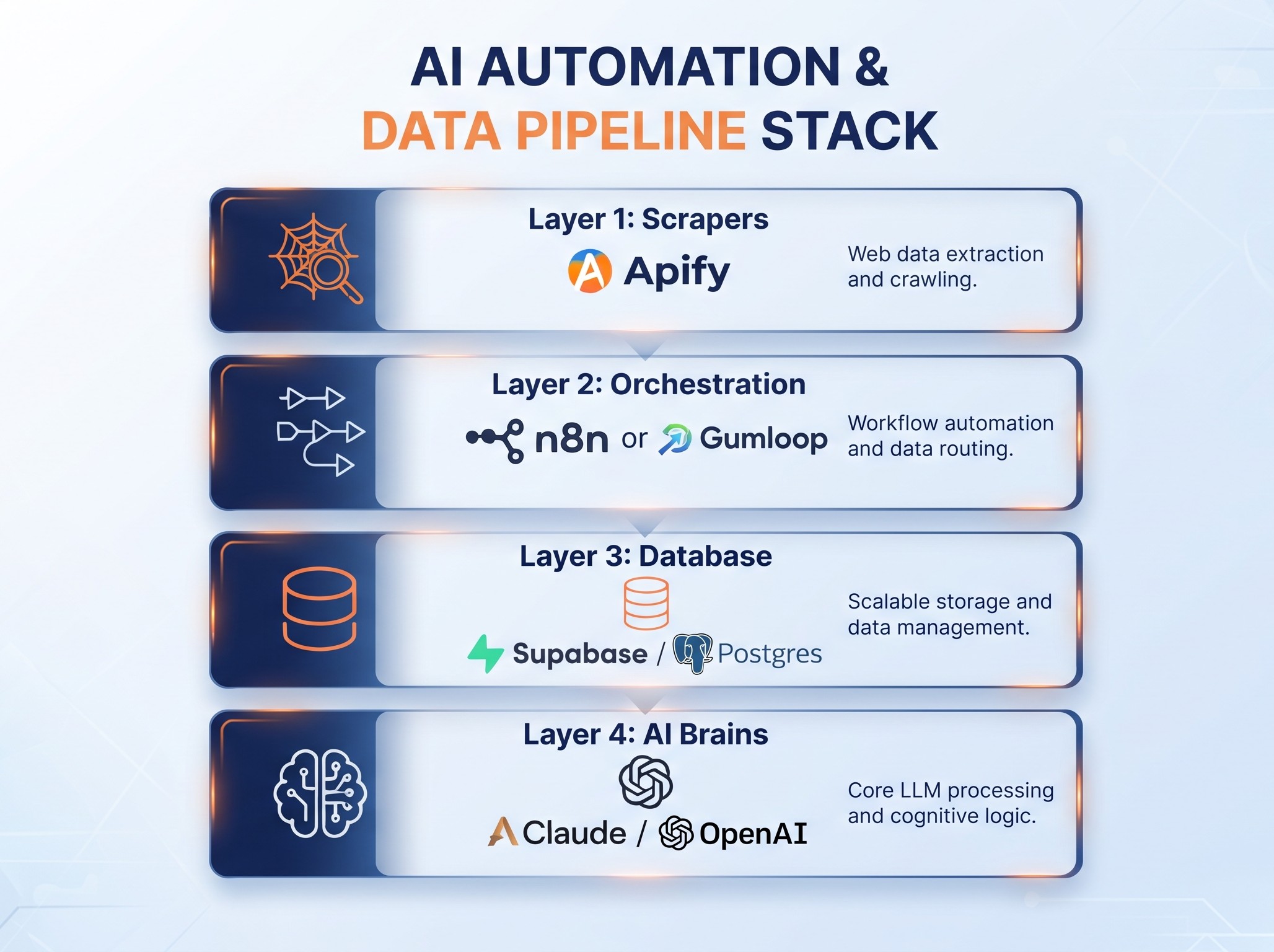
Layer 1 — Scrapers (Apify) This is how data gets into your pipeline. Apify is the tool that keeps coming up because it handles what raw scraping can’t — proxy rotation, session management, JavaScript rendering, anti-bot evasion. Its marketplace has pre-built Actors for common targets (LinkedIn, Amazon, Google Maps, Facebook Ads Library) so you’re not maintaining custom scrapers that break every time a site changes its HTML. The free tier sits around $5/month in credits, and it has a native verified node in n8n.
Layer 2 — Orchestration (n8n or Gumloop) This is the routing layer. It decides when to trigger the scraper, what to do with the output, how to call the AI, and where to store the result. This is where the Gumloop vs. n8n question actually lives.
Layer 3 — Database (Supabase/Postgres) Scraped and enriched data has to land somewhere queryable. Supabase gives you Postgres with a clean API, built-in vector storage for embeddings, and real-time subscriptions if you need live dashboards. Both n8n and Gumloop can write to it — the difference is in how much friction that involves.
Layer 4 — AI Brains (Claude/OpenAI) The enrichment layer. Takes raw scraped content and turns it into something structured and useful — summaries, classifications, sentiment, extracted entities, generated copy. Both tools support multiple model providers. This layer is where costs escalate fastest, which directly affects which orchestration tool makes more sense financially.
If you’re new to n8n’s pricing and want to understand what the free tier actually includes before committing, I covered that [https://aiflohub.com/is-n8n-really-free-what-the-free-plan-actually-includes-in-2026/]
What Gumloop actually is
<cite index=”18-1″>Gumloop is a no-code AI workflow automation platform built around a drag-and-drop node canvas.</cite> The key design decision and the thing that makes it different from n8n is that AI isn’t an integration, it’s the native primitive. Every node is designed with AI calls in mind.
<cite index=”21-1″>It uses a credit-based pricing model: free with 2,000 credits, Pro at around $37/month for 10,000 credits, and custom Enterprise above that.</cite>
Here’s the credit math that most people miss: <cite index=”18-1″>a standard AI call costs 2 credits, while an advanced call using GPT-4.1 or Claude Sonnet costs 20 credits. Complex AI-intensive workflows run 20–60 credits per call.</cite> If your pipeline hits 10 enrichment calls per scrape job and you’re running it 50 times a day, you’ll do that maths pretty fast.
<cite index=”23-1″>Both plans include unlimited team seats</cite>, which is a genuine structural advantage — most automation tools charge per seat, and that adds up quickly when you’re sharing workflows with a team.
<cite index=”21-1″>Unused credits do not roll over to the next month on standard plans.</cite> A slow month means wasted allowance.
What Gumloop is genuinely good at:
- Building multi-step AI prompt chains fast, without touching code
- Enrichment workflows: lead research, document extraction, content classification
- Teams who want AI-native automation without managing a stack
- Prototyping complex AI pipelines in hours, not days
Where it runs out:
Gumloop’s scraping nodes handle basic web content. They are not Apify. For targets that rotate proxies, render JavaScript, or block bots the kind of data sources that make autonomous scraping valuable in the first place you’ll hit the ceiling.
<cite index=”21-1″>For non-AI automation, traditional platforms are significantly cheaper: Make starts at $10.59/month for 10,000 operations, and n8n is free for self-hosting.</cite> Once you need serious scraping and want control over your AI spend, Gumloop’s bundled credit model starts working against you.
What n8n actually is (for this use case)
<cite index=”3-1″>n8n Cloud pricing starts at around $24/month for the Starter plan with 2,500 executions. The self-hosted Community Edition is free with unlimited executions.</cite>
<cite index=”7-1″>One workflow run counts as one execution, regardless of how many nodes it contains. A 15-step workflow with an AI call, three database writes, and a conditional branch is still one execution.</cite> This is why n8n is structurally cheaper for complex pipelines than per-task billing tools.
<cite index=”3-1″>In April 2026, n8n removed active workflow limits across every plan. You now only pay based on executions, not the number of workflows you have running.</cite>
For the 4-layer stack specifically, what matters is that <cite index=”32-1″>n8n has a native, verified Apify node built and maintained by Apify themselves</cite>, plus <cite index=”33-1″>a Supabase node that lets you automate database updates, synchronise data, and create triggers for events all within the same workflow.</cite>
That means the entire stack Apify fires, n8n routes, Supabase stores, Claude enriches runs inside one visual orchestration layer with one billing counter.
What n8n is genuinely good at:
- Orchestrating external tools rather than replacing them
- Long, multi-step pipelines where per-step billing would be expensive
- Full control over your AI spend (you use your own API keys)
- Self-hosting if you want unlimited executions for ~$5/month VPS cost
- Handling the scraping, enrichment, storage, and trigger logic in one canvas
Where it runs out:
The setup ceiling is real. <cite index=”4-1″>Self-hosting typically takes 30–60 minutes if you follow a guide</cite>, but that’s the optimistic version on a clean VPS. Docker Compose, environment variables, reverse proxy, HTTPS, and backups it’s not a morning’s work if you haven’t done it before. And if something breaks at 2am when a scheduled workflow fails, it’s your problem.
Cloud n8n removes that, but then you’re back to a monthly subscription and an execution counter.
The head-to-head where it actually matters
| What you care about | Gumloop | n8n |
|---|---|---|
| Setup time | Minutes, no server | 30–60 min (cloud) to hours (self-hosted) |
| AI model costs | Bundled into credits | Your own API keys |
| Scraping power | Basic web nodes | Apify native node (serious scraping) |
| Database integration | Supabase via HTTP | Native Supabase node |
| Execution pricing | Credit per AI action | One credit per full workflow run |
| Complex pipelines | Gets expensive fast | Gets cheaper the more steps you add |
| Self-hosting | Not available | Free with unlimited executions |
| Team collaboration | Unlimited seats on paid | Unlimited on all plans (2026 change) |
| Community + templates | Growing | 1,700+ templates, 45,000+ community |
| Best for | AI-first, fast prototyping | Full stack orchestration and control |
The cost that surprises people
Here’s the calculation nobody does before choosing.
Say your pipeline runs once an hour, grabs 20 URLs from Apify, runs each through Claude Sonnet for enrichment (20 credits each), and stores results in Supabase. That’s 24 runs per day × 20 AI calls = 480 advanced credit calls daily. <cite index=”18-1″>At 20 credits per advanced call</cite>, you’re burning 9,600 credits a day. Gumloop’s Pro plan gives you 10,000 credits a month.
On n8n: that same pipeline is 24 executions per day × 30 days = 720 executions per month. On the Starter plan (~$24/month), you have 2,500 executions. And you’re calling Claude directly with your own Anthropic API key that cost is separate and visible, not buried in credits.
The point isn’t that one is cheaper in absolute terms. It’s that Gumloop’s credit model makes AI-heavy, high-frequency pipelines expensive fast, while n8n keeps execution costs low and makes your AI spend transparent and separately trackable.
The workflow that actually connects all four layers
This is what the real stack looks like in n8n. You can rebuild it in Gumloop, but the Apify and database integration requires more HTTP node workarounds than native nodes.
Step 1 — Set the trigger. A Schedule trigger in n8n fires your workflow at the interval you define. Hourly for fresh competitor data, daily for lead research, weekly for market monitoring. Set it once, forget it.
Step 2 — Fire the Apify Actor. The Apify node in n8n lets you call any Actor in the marketplace LinkedIn scraper, a Google Maps extractor, the Facebook Ad Library crawler. <cite index=”30-1″>Apify Actors handle proxy rotation, session drops, and browser automation out of the box</cite>, so you’re not babysitting scrapers. Pass your target URLs or search query, get structured JSON back.
Step 3 — Route and filter. n8n’s IF node, Switch node, and Set node let you filter the raw output only pass rows above a certain follower count, only pass ads running longer than 7 days, only pass leads matching a keyword. This logic is free: it’s the same execution counter.
Step 4 — Call your AI brain. The OpenAI or Anthropic node takes each filtered item and runs your prompt. Summarise the ad copy. Extract the company name and pain point. Score the lead on a rubric. Generate a personalised outreach line. One prompt template, running against each scraped item in a loop.
Step 5 — Write to Supabase. The Supabase node writes enriched rows directly to your Postgres table. You can also push embeddings to Supabase’s vector store if you’re building retrieval later. Clean API, native authentication, no extra middleware.
Step 6 — Notify or trigger next step. Send the enriched output to Slack, email a digest, drop it into Airtable for review, or trigger a second n8n workflow that handles outreach. The pipeline is composable you’re not locked into one output.
That’s the full loop. Apify scrapes, n8n routes, Claude enriches, Supabase stores. Every part of it runs automatically, and the total monthly cost at moderate volume is a $5–7 VPS (or the n8n Cloud Starter), your Apify plan, and your API usage.
Mistakes worth avoiding
Building the pipeline in Gumloop first, then migrating. If your pipeline eventually needs Apify-level scraping or you want to control your API costs, you’ll rebuild it. Start with the architecture that fits your endgame, not your first two days.
Ignoring the credit maths until you hit the wall. Run your expected frequency through Gumloop’s credit calculator before choosing a plan. High-frequency, AI-heavy pipelines are the exact case where cost surprises happen.
Treating self-hosted n8n as “just add a VPS.” Backups, patches, HTTPS, and monitoring are real ongoing costs in time if not money. If you can’t commit to them, n8n Cloud is the right answer even at the higher price.
Using a generic LLM prompt on scraped data. The quality of the AI layer depends almost entirely on prompt engineering. A bad prompt on good data still produces garbage. This is where most pipelines fail first, and it has nothing to do with which orchestration tool you chose.
Not separating your API keys per project. When you use n8n with your own Claude or OpenAI key, set up separate keys per client or project if you’re doing this for others. Cost attribution becomes impossible otherwise.
Building one giant workflow instead of composable ones. A 40-node single workflow is hard to debug, hard to update, and fails as one unit. Split it: scrape workflow, enrich workflow, store workflow, notify workflow. They chain via webhooks or shared database state.
So which one?
Gumloop if you want to be up and running with an AI-powered workflow today, you’re not doing high-frequency scraping, and you’d rather pay a predictable subscription than manage a server or track API costs. It genuinely earns its place for enrichment-heavy, AI-first workflows where the volume stays manageable.
n8n if you’re building the full 4-layer stack Apify scraping data at real volume, an AI brain enriching it, Supabase storing structured output, and the whole thing running autonomously on a schedule. The native integrations, the per-run execution model, and the self-hosting option make it the right centre of gravity for a serious autonomous pipeline.
The actual automation consultants building client pipelines in this space consistently land on n8n as the orchestration layer, with Apify handling scraping, Supabase handling storage, and Claude or OpenAI called via API key. <cite index=”30-1″>There’s a reason Apify published a full tutorial building an ad intelligence agent using exactly that stack Apify, n8n, and Supabase rather than routing it through Gumloop.</cite>
Gumloop isn’t wrong. It’s just not the centre of the stack that consultants actually charge clients to build.
FAQ
Is Gumloop or n8n better for beginners?
Gumloop. No server setup, no Docker, no VPS you sign up and build. n8n’s learning curve is manageable but longer, especially if you self-host.
Can Gumloop replace Apify for web scraping?
For basic web content, yes. For targets that require proxy rotation, JavaScript rendering, or anti-bot handling no. Apify’s purpose-built Actors handle the hard scraping cases that Gumloop’s web nodes don’t.
Why do automation agencies prefer n8n?
Mainly cost control and composability. The per-run execution model keeps costs predictable on complex pipelines, the Apify and Supabase native nodes reduce integration friction, and self-hosting removes the per-execution ceiling entirely.
What does an AAA tech stack actually look like?
Four layers: Apify (scraping), n8n (orchestration), Supabase or Postgres (storage and vectors), Claude or OpenAI (AI enrichment). n8n has verified native nodes for both Apify and Supabase, making it the natural orchestration hub.
How much does the 4-layer stack cost to run?
Rough estimate at moderate volume: $5–7/month VPS for self-hosted n8n (or $24/month cloud), Apify free tier at ~$5/month, Supabase free tier up to 500MB database storage, and Claude or OpenAI API costs depending on usage. Total can be under $30–40/month for a personal or small-team pipeline.
Can I use both Gumloop and n8n together?
Technically yes Gumloop outputs can be sent to webhooks, and n8n can receive them. In practice, most people choose one as the orchestration centre and use the other for specific sub-tasks. Running two full orchestration layers adds more complexity than it solves.
Leave a Reply